
编辑 项目目录/.idea/workspace.xml
添加标签后,保存。重启idea即可。
<component name="RunDashboard"> <option name="configurationTypes"> <set> <option value="SpringBootApplicationConfigurationType" /> </set> </option> <option name="ruleStates"> <list> <RuleState> <option name="name" value="ConfigurationTypeDashboardGroupingRule" /> </RuleState> <RuleState> <option name="name" value="StatusDashboardGroupingRule" /> </RuleState> </list> </option></component>显示结果如下
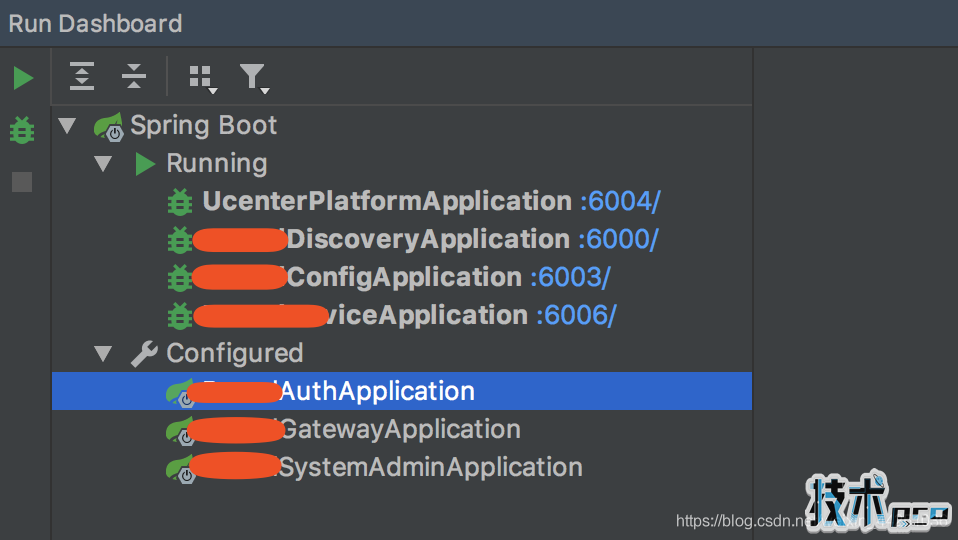
到此这篇关于idea中显示springboot面板,方便启动调试的文章就介绍到这了。
您可能感兴趣的文章:
- springboot themaleaf 第一次进页面不加载css的问题
- SpringBoot配置绑定方法详解
- SpringBoot本地磁盘映射问题
- SpringBoot参数校验与国际化使用教程
- SpringBoot在yml配置文件中配置druid的操作
- SpringBoot一个非常蛋疼的无法启动的问题解决
- springboot中JSONObject遍历并替换部分json值
- 详解SpringBoot配置文件启动时动态配置参数方法