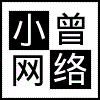
这个小程序可以自己设定行数和列数进行图片切割
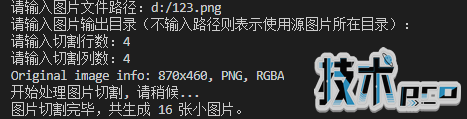
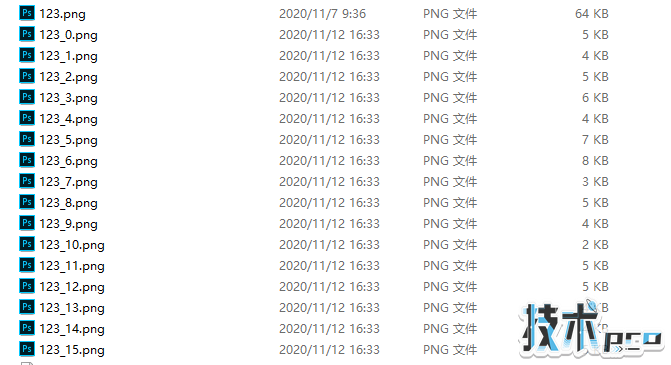
import osfrom PIL import Imagedef splitimage(src, rownum, colnum, dstpath): img = Image.open(src) w, h = img.size if rownum <= h and colnum <= w: print(&#39;Original image info: %sx%s, %s, %s&#39; % (w, h, img.format, img.mode)) print(&#39;开始处理图片切割, 请稍候...&#39;) s = os.path.split(src) if dstpath == &#39;&#39;: dstpath = s[0] fn = s[1].split(&#39;.&#39;) basename = fn[0] ext = fn[-1] num = 0 rowheight = h // rownum colwidth = w // colnum for r in range(rownum): for c in range(colnum): box = (c * colwidth, r * rowheight, (c + 1) * colwidth, (r + 1) * rowheight) img.crop(box).save(os.path.join(dstpath, basename + &#39;_&#39; + str(num) + &#39;.&#39; + ext), ext) num = num + 1 print(&#39;图片切割完毕,共生成 %s 张小图片。&#39; % num) else: print(&#39;不合法的行列切割参数!&#39;)src = input(&#39;请输入图片文件路径:&#39;)if os.path.isfile(src): dstpath = input(&#39;请输入图片输出目录(不输入路径则表示使用源图片所在目录):&#39;) if (dstpath == &#39;&#39;) or os.path.exists(dstpath): row = int(input(&#39;请输入切割行数:&#39;)) col = int(input(&#39;请输入切割列数:&#39;)) if row > 0 and col > 0: splitimage(src, row, col, dstpath) else: print(&#39;无效的行列切割参数!&#39;) else: print(&#39;图片输出目录 %s 不存在!&#39; % dstpath)else: print(&#39;图片文件 %s 不存在!&#39; % src)运行效果
以上就是利用python切割图片的示例的详细内容。
您可能感兴趣的文章:
- 关于Python的异常捕获和处理
- 关于使用Python的time库制作进度条程序
- 关于python的第三方库下载与更改方式
- Python的turtle绘图库使用基础
- python如何用正则表达式提取字符串
- python中的txt文件转换为XML
- 详解Python中四种关系图数据可视化的效果对比
- 解决Python httpx 运行过程中无限阻塞的问题