1、在 Spring Boot 开发环境下禁用模板缓存
#开发环境下关闭 thymeleaf 模板缓存,thymeleaf 默认是开启状态spring.thymeleaf.cache=false2.引入依赖
<!--热部署--> <dependency> <groupId>org.springframework.boot</groupId> <artifactId>spring-boot-devtools</artifactId> </dependency>3.Intellij IEDA 和 Eclipse 不同,Intellij IDEA 必须做一些小调整
在 Eclipse 中,修改文件后要手动进行保存,它就会自动编译,就触发热部署现象,而在 Intellij IEDA 中,修改文件后都是自动保存,默认不会自动编译文件,需要手动编译按 Ctrl + F9 (推荐使用)或 Build ->Build Project ;或者进行以下设置才会自动编译(效果不明显)。
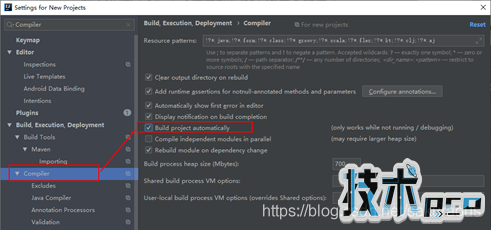
(File -> Settings -> Build, Execution, Deployment -> Compiler -> 勾选 Build project automatically)
您可能感兴趣的文章:
- springboot themaleaf 第一次进页面不加载css的问题
- SpringBoot配置绑定方法详解
- SpringBoot本地磁盘映射问题
- SpringBoot参数校验与国际化使用教程
- SpringBoot在yml配置文件中配置druid的操作
- SpringBoot一个非常蛋疼的无法启动的问题解决
- springboot中JSONObject遍历并替换部分json值
- 在idea中显示springboot面板的方法
- 动态上传jar包热部署的实战详解