需要用到的库:
tkinter:构建gui界面
pyperclip:复制功能
random:生成随机数
string:处理字符串
代码:
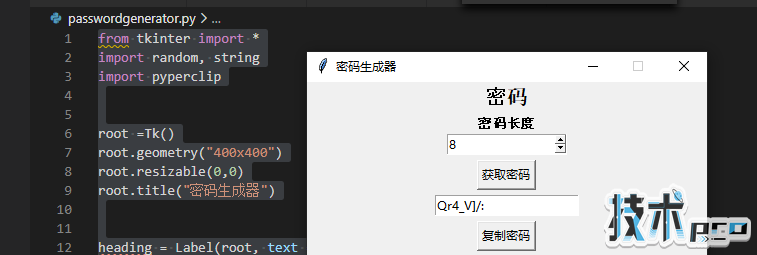
from tkinter import *import random, stringimport pypercliproot =Tk()root.geometry("400x400")root.resizable(0,0)root.title("密码生成器")heading = Label(root, text = '密码' , font ='arial 15 bold').pack()pass_label = Label(root, text = '密码长度', font = 'arial 10 bold').pack()pass_len = IntVar()length = Spinbox(root, from_ = 8, to_ = 32 , textvariable = pass_len , width = 15).pack()pass_str = StringVar()def Generator(): password = '' for x in range (0,4): password = random.choice(string.ascii_uppercase)+random.choice(string.ascii_lowercase)+random.choice(string.digits)+random.choice(string.punctuation) for y in range(pass_len.get()- 4): password = password+random.choice(string.ascii_uppercase + string.ascii_lowercase + string.digits + string.punctuation) pass_str.set(password) Button(root, text = "获取密码" , command = Generator ).pack(pady= 5)Entry(root , textvariable = pass_str).pack()def Copy_password(): pyperclip.copy(pass_str.get())Button(root, text = '复制密码', command = Copy_password).pack(pady=5)root.mainloop()运行效果:
想要了解更多关于python的知识,资讯,实用工具欢迎关注python客栈

以上就是用python写一个带有gui界面的密码生成器的详细内容。
您可能感兴趣的文章:
- 关于Python的异常捕获和处理
- 关于使用Python的time库制作进度条程序
- 关于python的第三方库下载与更改方式
- Python的turtle绘图库使用基础
- python如何用正则表达式提取字符串
- python中的txt文件转换为XML
- 详解Python中四种关系图数据可视化的效果对比
- 解决Python httpx 运行过程中无限阻塞的问题