本文实例为大家分享了JS实现手风琴特效的具体代码,供大家参考,具体内容如下
效果图
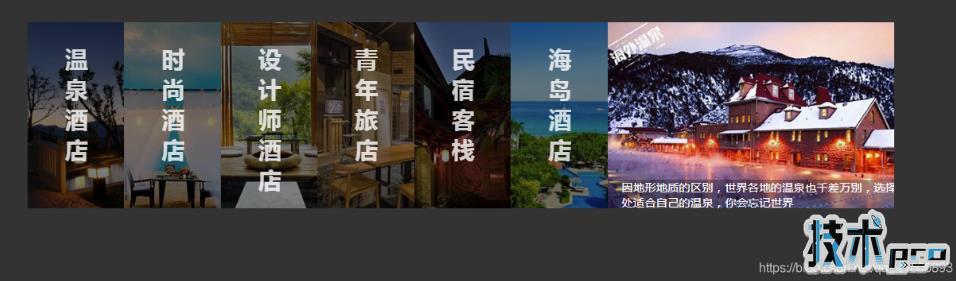
<!DOCTYPE html><html><head> <meta charset="UTF-8"> <meta name="viewport" content="width=device-width, initial-scale=1.0"> <meta http-equiv="X-UA-Compatible" content="ie=edge"> <title>手风琴</title> <link rel="stylesheet" href="index.css" rel="external nofollow" ></head><body> <div> <ul> <li> <div> <h1>温泉酒店</h1> </div> <div class="picBox picBox1"></div> <div>有谁不爱泡温泉?浸入雾气蒸腾的泉水之中,把身体泡成一片茶叶,舒展轻盈。有比这更美妙的感觉吗?</div> </li> <li> <div> <h1>时尚酒店</h1> </div> <div class="picBox picBox2"></div> <div>浪漫,是香闺围笼,是灯火迷离,泪眼婆裟的唯美,是杨柳岸、晓风残月中的无语凝噎……</div> </li> <li> <div> <h1>设计师酒店</h1> </div> <div class="picBox picBox3"></div> <div>前卫的酒店设计理念,独具魅力的风格,优美的自然风光才能有这样顶级的酒店</div> </li> <li> <div> <h1>青年旅店</h1> </div> <div class="picBox picBox4"></div> <div>我为你煮一杯温茶,斟一杯美酒。让我们席地而坐,听你的梦想。用你的只言片语装点我们的梦想博物馆</div> </li> <li> <div> <h1>民宿客栈</h1> </div> <div class="picBox picBox5"></div> <div>在这里,你可以静静发呆,而不被人打扰;在这里,你能看见最美好的星星,能让你找到最深的感动</div> </li> <li> <div> <h1>海岛酒店</h1> </div> <div class="picBox picBox6"></div> <div>不想过冬,厌倦沉重,就飞去热带的岛屿游泳,卸下包袱,放下压力,在这碧海蓝天之中</div> </li> <li> <div> <h1>海外酒店</h1> </div> <div class="picBox picBox7"></div> <div>因地形地质的区别,世界各地的温泉也千差万别,选择一处适合自己的温泉,你会忘记世界</div> </li> </ul> </div> <script src="jquery.js"></script> <script src="index.js"></script></body></html>JS代码
var oUl = $(&#39;ul&#39;), oLi = $(&#39;li&#39;), len = oLi.length, width = parseInt(oUl.css(&#39;width&#39;)), gw = width / len, ot = Math.floor((width - 400) / (len - 1)); flag = true;function init(){ if(flag){ change($(oLi[len-1])); }}function bindEvent(){ oLi.on(&#39;click&#39;,function(){ change($(this)); if(($(this).index() +1) == len){ flag = false; }else{ flag = true; } }); oUl.on(&#39;mouseleave&#39;,function(){ init(); })}function change(event){ event.animate({ &#39;width&#39;:&#39;400px&#39; },300,&#39;linear&#39;).siblings().animate({ &#39;width&#39;:ot + &#39;px&#39; },300,&#39;linear&#39;); event.find(&#39;.title&#39;).css({ &#39;display&#39;:&#39;none&#39; }) event.siblings().find(&#39;.title&#39;).css({ &#39;display&#39;:&#39;block&#39; }) event.find(&#39;.decration&#39;).css({ &#39;bottom&#39;:&#39;0px&#39; }) event.siblings().find(&#39;.decration&#39;).css({ &#39;bottom&#39;:&#39;-50px&#39; })}init();bindEvent();CSS代码
*{ margin:0; padding:0; list-style:none;}body{ background-color:#333;}.wrapper{ width:80%; margin:50px auto; padding:40px;}.wrapper ul{ width:100%; height:300px; overflow: hidden;}.wrapper ul li{ float: left; width:14.2; height:260px; position:relative; overflow:hidden; cursor:pointer; }.picBox{ width:100%; height:100%;}.picBox1{ background:url(images/1.jpg) no-repeat center 0;}.picBox2{ background:url(images/2.jpg) no-repeat center 0;}.picBox3{ background:url(images/3.jpg) no-repeat center 0;}.picBox4{ background:url(images/4.jpg) no-repeat center 0;}.picBox5{ background:url(images/5.jpg) no-repeat center 0;}.picBox6{ background:url(images/6.jpg) no-repeat center 0;}.picBox7{ background:url(images/7.jpg) no-repeat center 0;}.wrapper ul li .title{ position:absolute; overflow:hidden; width:100%; height:100%; left:0; top:0; background:rgba(0,0,0,0.5);}.wrapper ul li .title h1{ color:#fff; width:30px; margin:0 auto; display:block; font:20px; padding-top:30px; opacity:0.8;}.wrapper ul li .decration{ width:400px; height:40px; padding-left:20px; padding-right:30px; position:absolute; left:0; bottom:-50px; background:rgba(0,0,0,0.3); color:#FFF; }以上就是本文的全部内容,希望对大家的学习有所帮助。