本文实例为大家分享了小程序实现点击tab切换左右滑动的具体代码,供大家参考,具体内容如下
wxml
<scroll-view scroll-x="true" class="navbar-box"> <block wx:for="{{recordMain}}" wx:for-index="idx" wx:for-item="navItem" wx:key="idx"> <view class="nav-item " data-current="{{idx}}" bindtap="switchNav"> <text class="{{currentTab == idx ? &#39;active&#39; : &#39;&#39;}}">{{navItem.title}}</text> </view> </block></scroll-view><swiper style="margin-top:80rpx;height:{{winHeight - 40}}px;" class="tab-box" current="{{currentTab}}" duration="300" data-current="{{idx}}" bindchange="switchTab"> <swiper-item style="height:100%;overflow-y:scroll" wx:for="{{[0,1,2,3,4,5]}}" wx:for-item="tabItem" wx:for-index="idx" wx:key="idx" class="tab-cnetent"> <block wx:for="{{tabContent}}" wx:key=" " bindtap=&#39;myOrderDetails&#39;> <!-- 列表 --> <view class=&#39;listBox&#39;> <view class=&#39;listTop&#39;> <image src=&#39;{{item.goodsImg}}&#39; class=&#39;goodsImg&#39;></image> <view class=&#39;infor&#39;> <view class=&#39;&#39;> <text class=&#39;name&#39;>{{item.name}}</text> <text class=&#39;price&#39;>¥{{item.price}}</text> </view> <view class=&#39;&#39;> <text class=&#39;choose&#39;>{{item.choose}}</text> <text class=&#39;number&#39;>×{{item.number}}</text> </view> </view> </view> <view class=&#39;listBottom&#39;> <view>共{{item.number}}件商品,合计:¥{{item.allPrice}}</view> <view class=&#39;status&#39;> <button>查看物流</button> <button>确认收货</button> </view> </view> </view> </block> </swiper-item></swiper>wxss
::-webkit-scrollbar { width: 0; height: 0; color: transparent;}.navbar-box { height: 70rpx; line-height: 70rpx; position: fixed; top: 0rpx; background: white}.nav-item { display: inline-block; width: 16.6%; text-align: center;}.nav-item text { padding-bottom: 10rpx;} page { background: #f2f2f2; font-size: 28rpx;}.active { color: #a53533; border-bottom: 4rpx solid #a53533; box-sizing: border-box;}.menu { font-size: 28rpx; width: 100%; /* overflow-x: scroll; */ border-bottom: 20rpx solid #f2f2f2; padding: 30rpx 30rpx 0rpx 30rpx; box-sizing: border-box; display: flex; justify-content: space-between; position: fixed; top: 0rpx; z-index: 999; background: white;}.chooseNav { padding-bottom: 10rpx;}.listBox { padding: 30rpx; width: calc(100% - 60rpx); margin-left: 30rpx; margin-top: 30rpx; background: white; box-sizing: border-box; border-radius: 8rpx;} .listTop { display: flex; justify-content: space-between;}.goodsImg { width: 200rpx; height: 200rpx; margin-right: 20rpx;}.infor { flex: 1; margin-top: 80rpx; font-size: 26rpx; color: #666;}.infor view { width: 100%; display: flex; justify-content: space-between;}.infor view:nth-of-type(2) { font-size: 24rpx;}.name, .choose { font-weight: 600; display: inline-block; overflow: hidden; text-overflow: ellipsis; white-space: nowrap; width: 320rpx;}.price, .number { padding: 5rpx 10rpx; box-sizing: border-box;}.listBottom { text-align: right;}button::after { border: none;}.status button { display: inline-block; background: white; border: 1px solid #dedede; border-radius: 66rpx; font-size: 24rpx; margin-left: 20rpx; color: #666; padding: 0rpx 30rpx; box-sizing: border-box; height: 50rpx; line-height: 45rpx; margin-top: 20rpx;}wxjs
Page({ data: { recordMain: [ { title: "全部" }, { title: "待付款" }, { title: "待发货" }, { title: "待发货" }, { title: "已完成" }, { title: "已取消" }, ], tabContent: [ { goodsImg: &#39;/img/goods.png&#39;, name: &#39;阿莎玛沙阿莎玛沙发阿莎玛沙发阿莎玛沙发阿莎玛沙莎玛沙发发&#39;, price: "666", choose: &#39;已选:全新,16期&#39;, number: &#39;32&#39;, allPrice: &#39;888&#39; }, ], currentTab: 0, navScrollLeft: 0, winWidth: 0, winHeight: 0, }, // 事件处理函数 onLoad: function () { var that = this; /** 获取系统信息*/ wx.getSystemInfo({ success: function (res) { that.setData({ winWidth: res.windowWidth, winHeight: res.windowHeight, }); } }); }, // 滑动事件 // 点击标题切换当前页时改变样式 switchNav:function(e) { console.log(e.currentTarget.dataset.current) var that = this var cur = e.currentTarget.dataset.current; if (that.data.currentTab == cur) { return false; } else { that.setData({ currentTab: cur }) } }, // 滚动切换标签样式 switchTab: function(e) { console.log(e) var that = this; that.setData({ currentTab: e.detail.current }); if (e.detail.current == 0) { console.log(0) } else if (e.detail.current == 1) { console.log(11) } else if (e.detail.current == 2) { console.log(2222) } else if (e.detail.current == 3) { console.log(33333) } else if (e.detail.current == 4) { console.log(44444444) } else if (e.detail.current == 5) { console.log(55555) } }})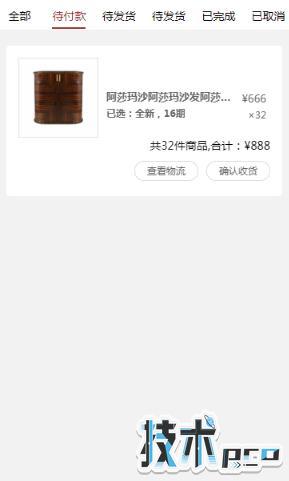
以上就是本文的全部内容,希望对大家的学习有所帮助。