
本文实例为大家分享了微信小程序自定义底部弹出框的具体代码,供大家参考,具体内容如下
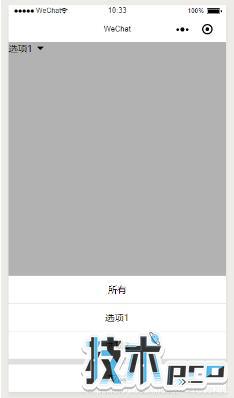
实现这么一个功能,点击选项进行选择,效果是从底部弹出选项框(带滑出动画),选择了某项或者点击其他地方,隐藏(带滑出动画)。效果图如下:
可适用于任何场景,如普通选项(如图)或者类似商城小程序选择商品属性的弹出框。只需要把内容替换自己需要的即可。
1. wxml代码
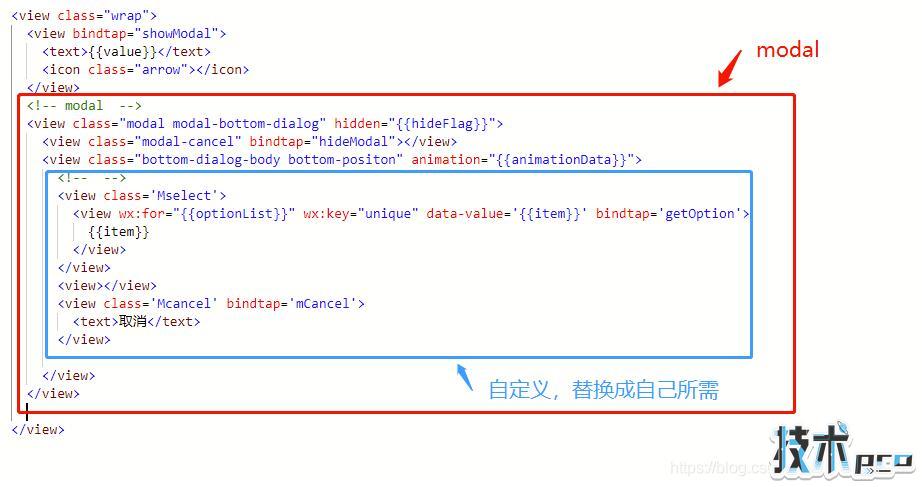
{{value}} {{item}} 取消 modal中,蓝色框框起来的,可按需替换。
2. wxss代码
.arrow{ display:inline-block; border:6px solid transparent; border-top-color:#000; margin-left:8px; position:relative; top:6rpx;}/* ---------------------------- *//*模态框*/.modal{position:fixed; top:0; right:0; bottom:0; left:0; z-index:1000;}.modal-cancel{position:absolute; z-index:2000; top:0; right:0; bottom: 0; left:0; background:rgba(0,0,0,0.3);}.bottom-dialog-body{width:100%; position:absolute; z-index:3000; bottom:0; left:0;background:#dfdede;}/*动画前初始位置*/.bottom-positon{-webkit-transform:translateY(100%);transform:translateY(100%);} /* 底部弹出框 */.bottom-positon{ text-align: center;}.Mselect{ margin-bottom: 20rpx;}.Mselect view{ padding: 26rpx 0; background: #fff;}.Mselect view:not(:last-of-type){ border-bottom: 1px solid #dfdede;}.Mcancel{ background: #fff; padding: 26rpx 0;}如果项目中,多个页面使用了同样效果弹出框,如下的代码可以放到公共样式文件app.wxss中。

3. js代码
Page({ /** * 页面的初始数据 */ data: { optionList:['所有','选项1','选项2'], value:'所有', hideFlag: true,//true-隐藏 false-显示 animationData: {},// }, // 点击选项 getOption:function(e){ var that = this; that.setData({ value:e.currentTarget.dataset.value, hideFlag: true }) }, //取消 mCancel: function () { var that = this; that.hideModal(); }, // ----------------------------------------------------------------------modal // 显示遮罩层 showModal: function () { var that = this; that.setData({ hideFlag: false }) // 创建动画实例 var animation = wx.createAnimation({ duration: 400,//动画的持续时间 timingFunction: 'ease',//动画的效果 默认值是linear->匀速,ease->动画以低速开始,然后加快,在结束前变慢 }) this.animation = animation; //将animation变量赋值给当前动画 var time1 = setTimeout(function () { that.slideIn();//调用动画--滑入 clearTimeout(time1); time1 = null; }, 100) }, // 隐藏遮罩层 hideModal: function () { var that = this; var animation = wx.createAnimation({ duration: 400,//动画的持续时间 默认400ms timingFunction: 'ease',//动画的效果 默认值是linear }) this.animation = animation that.slideDown();//调用动画--滑出 var time1 = setTimeout(function () { that.setData({ hideFlag: true }) clearTimeout(time1); time1 = null; }, 220)//先执行下滑动画,再隐藏模块 }, //动画 -- 滑入 slideIn: function () { this.animation.translateY(0).step() // 在y轴偏移,然后用step()完成一个动画 this.setData({ //动画实例的export方法导出动画数据传递给组件的animation属性 animationData: this.animation.export() }) }, //动画 -- 滑出 slideDown: function () { this.animation.translateY(300).step() this.setData({ animationData: this.animation.export(), }) }, })如上,用“// ------------------------------------------modal”隔开的以下的代码可不需要动。
如果一个页面中使用了两个同样效果的弹出框,只需要稍微修改一下就行了,这里就不贴出来。
以上就是本文的全部内容,希望对大家的学习有所帮助。